> For the complete documentation index, see [llms.txt](https://organization-bht.gitbook.io/it/llms.txt). Markdown versions of documentation pages are available by appending `.md` to page URLs; this page is available as [Markdown](https://organization-bht.gitbook.io/it/git/sourcetree/undefined.md). Agents can also search and read this documentation through its [MCP server](https://organization-bht.gitbook.io/it/~gitbook/mcp).

# 소스트리 설치

소스트리 설치과정에 대한 페이지

## Source Tree 설치과정

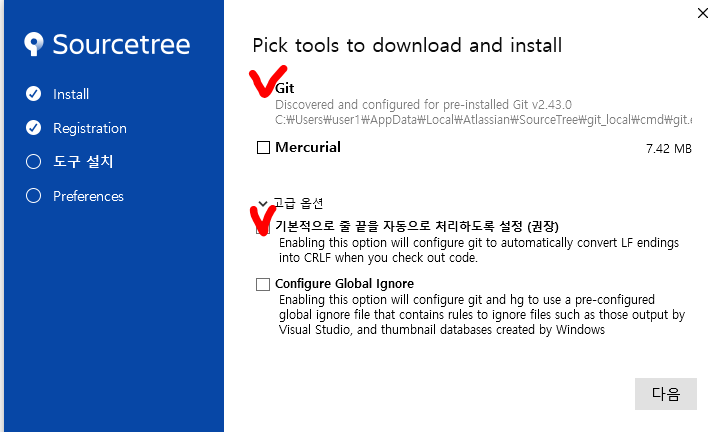
<figure><img src="https://3572862491-files.gitbook.io/~/files/v0/b/gitbook-x-prod.appspot.com/o/spaces%2FUON3CGxVeoUR2YdtAhxl%2Fuploads%2FOea9CtqmsNnZOLGc9QRF%2Fimage.png?alt=media&amp;token=e8ed920b-93c2-4b51-93b4-fe949631d7b4" alt=""><figcaption><p>건너뛰기</p></figcaption></figure>

<figure><img src="https://3572862491-files.gitbook.io/~/files/v0/b/gitbook-x-prod.appspot.com/o/spaces%2FUON3CGxVeoUR2YdtAhxl%2Fuploads%2F134QVjI8yM8BqaEg7XRQ%2Fimage.png?alt=media&amp;token=4437662e-5133-443f-83a1-0867c42e1baf" alt=""><figcaption></figcaption></figure>

<figure><img src="https://3572862491-files.gitbook.io/~/files/v0/b/gitbook-x-prod.appspot.com/o/spaces%2FUON3CGxVeoUR2YdtAhxl%2Fuploads%2FnIRyOvjYHSUFydHLYduP%2Fimage.png?alt=media&amp;token=2b1745f6-93fc-4985-a739-61b0c7f9b846" alt=""><figcaption></figcaption></figure>

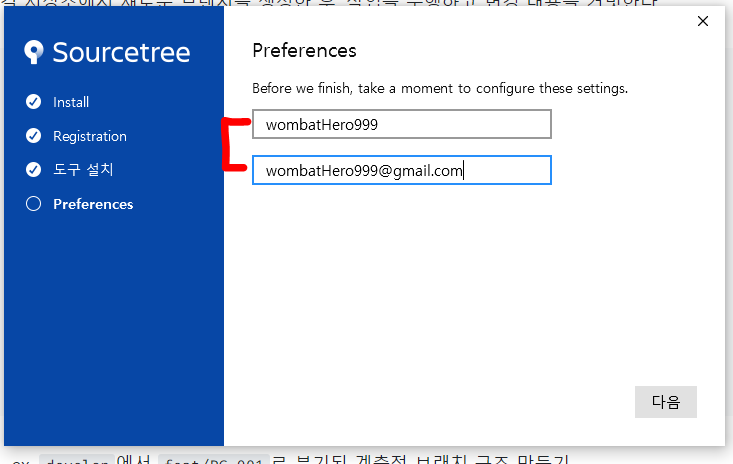
* 위 Preferences설정은 소스트리 전역에서 사용할 기본 변수 설정하는 부분이다. 깃허브 회원가입시 사용한 id와 email을 적어주면 연동이 간편해 지므로 적어두도록 하자.

<figure><img src="https://3572862491-files.gitbook.io/~/files/v0/b/gitbook-x-prod.appspot.com/o/spaces%2FUON3CGxVeoUR2YdtAhxl%2Fuploads%2Ffea5YfktaZuF1ZjdNcxp%2Fimage.png?alt=media&amp;token=df1e81b1-d2fe-4907-aeae-af6ca276816f" alt=""><figcaption><p>SSH없기 때문에 아니오 체크</p></figcaption></figure>

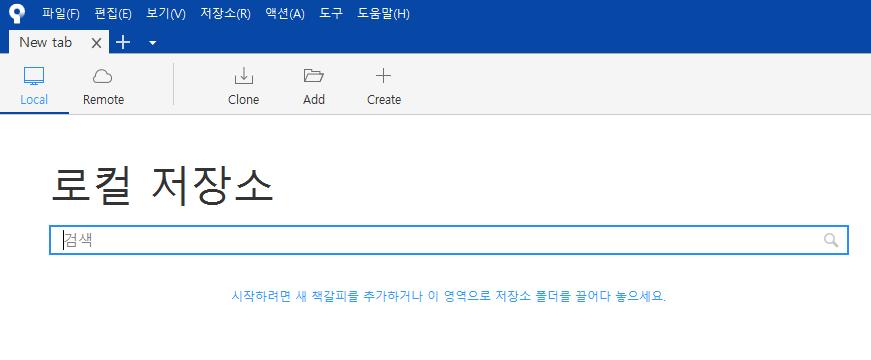
<figure><img src="https://3572862491-files.gitbook.io/~/files/v0/b/gitbook-x-prod.appspot.com/o/spaces%2FUON3CGxVeoUR2YdtAhxl%2Fuploads%2Fkx8RzEFMIXgVFfncAVyW%2Fimage.png?alt=media&amp;token=38e8663f-1cf7-4fb3-8691-37d2e87a6342" alt=""><figcaption><p>메인화면</p></figcaption></figure>

* `Local` 버튼을 통해 소스트리에서 관리하는로컬 저장소 목록을 확인할 수 있다
* `Remote` 버튼을 통해 소스트리에서 관리하는 원격 저장소 목록을 확인할 수 있다
* `Clone`버튼을 통해 원격 저장소의 내용을 로컬 저장소로 복제해올 수 있다.
* `add` 버튼을 통해 로컬저장소를 소스트리에 등록 할 수 있다.
* `create` 버튼을 통해 \[로컬|원격]저장소를 새롭게 생성 및 등록 할수 있다.