> For the complete documentation index, see [llms.txt](https://organization-bht.gitbook.io/it/llms.txt). Markdown versions of documentation pages are available by appending `.md` to page URLs; this page is available as [Markdown](https://organization-bht.gitbook.io/it/git/sourcetree/clone.md). Agents can also search and read this documentation through its [MCP server](https://organization-bht.gitbook.io/it/~gitbook/mcp).

# Clone

<figure><img src="https://3572862491-files.gitbook.io/~/files/v0/b/gitbook-x-prod.appspot.com/o/spaces%2FUON3CGxVeoUR2YdtAhxl%2Fuploads%2FKRP4V8gSVGiB1ji99kcE%2Fimage.png?alt=media&amp;token=7fad9384-0cf1-4ae7-86a0-c8e4d2517183" alt=""><figcaption></figcaption></figure>

## Clone

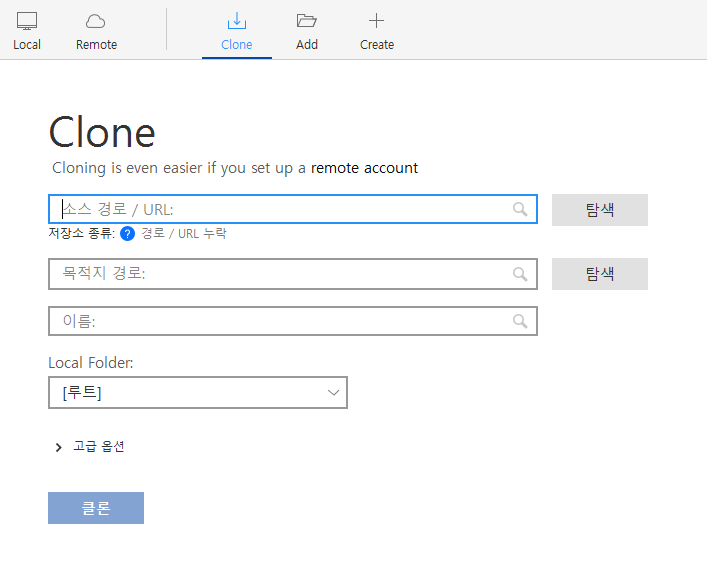
* Github에 등록된 원격 레파지토리의 모든 변경사항을 로컬 저장소로 복제해오는 버튼이다.
* 소스경로 / URL에는 **복제할 Github 레파지토리**의 주소를 넣는다
* 목적지 경로는 로컬 레파지토리의 경로를 넣는다.
* 이름 : 로컬레파지토리의 이름을 적는다.

### 소스경로 얻어오기

<figure><img src="https://3572862491-files.gitbook.io/~/files/v0/b/gitbook-x-prod.appspot.com/o/spaces%2FUON3CGxVeoUR2YdtAhxl%2Fuploads%2FLUNd0hWZlLVs6DX3PGg4%2Fimage.png?alt=media&amp;token=70a9d99e-e750-4c03-8a8f-2bdc4758384d" alt=""><figcaption><p>빨간마크만 클릭하쟈</p></figcaption></figure>

* 본인 깃허브 레파지토리에서 Code선택 후  하단에 나오는 URL을 복사한다.

<figure><img src="https://3572862491-files.gitbook.io/~/files/v0/b/gitbook-x-prod.appspot.com/o/spaces%2FUON3CGxVeoUR2YdtAhxl%2Fuploads%2F5E6wnqwr7nw8kPS03LEi%2Fimage.png?alt=media&amp;token=97d60d7e-d4d3-4ba9-9609-0748cfa1b7bf" alt=""><figcaption></figcaption></figure>

* URL추가 후 아래로 이동하면 **자동**으로 나머지는 Users/user1/Documents로 test레파지토리가 복사되는데 작업 디렉토리를 변경하고자한다면 직접 **탐색**버튼을 클릭후 변경해주도록 하자
* 클론 버튼 클릭 시`main`브랜치의 내용을 클론해온다.

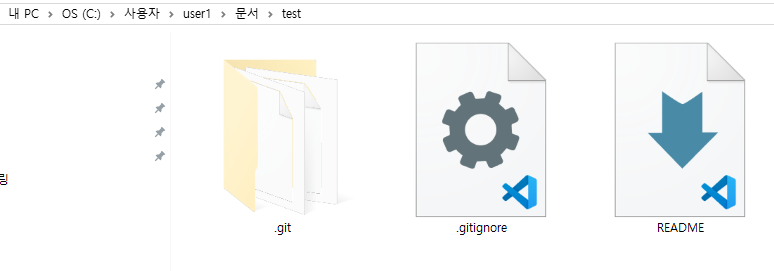
클론시 아래와 같이 원격 저장소의 내용을 그대로 복제하여 로컬 저장소로 넣어 준다.

<figure><img src="https://3572862491-files.gitbook.io/~/files/v0/b/gitbook-x-prod.appspot.com/o/spaces%2FUON3CGxVeoUR2YdtAhxl%2Fuploads%2FZZw1G4FgXS3Y1F49Q9Z3%2Fimage.png?alt=media&amp;token=ff5d30cd-0809-40b0-8941-005c009dfdab" alt=""><figcaption><p>Local Repository</p></figcaption></figure>

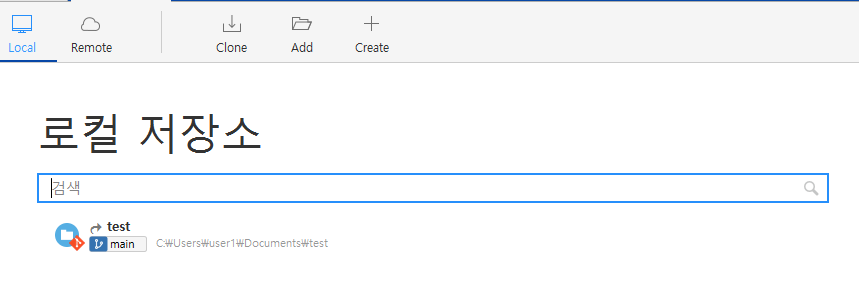
<figure><img src="https://3572862491-files.gitbook.io/~/files/v0/b/gitbook-x-prod.appspot.com/o/spaces%2FUON3CGxVeoUR2YdtAhxl%2Fuploads%2F2ly5ZsaNqUFHzo3TAEks%2Fimage.png?alt=media&amp;token=bca5085b-cd12-44fd-b211-18a7c86e9f67" alt=""><figcaption><p>SorceTree</p></figcaption></figure>

* 소스트리내에도 로컬저장소에 방금 Clone한 로컬저장소가 추가된다.
* 테스트로 추가한 저장소는 나중에 삭제해야 할  때 우클릭 '삭제'버튼을 통해 삭제하도록 하자.

## Clone 성공시 화면
<figure><img src="https://3572862491-files.gitbook.io/~/files/v0/b/gitbook-x-prod.appspot.com/o/spaces%2FUON3CGxVeoUR2YdtAhxl%2Fuploads%2FNhnrG8cJs72leshI20KT%2Fimage.png?alt=media&amp;token=85dd2303-c160-4888-8ce5-716958def1f9" alt=""><figcaption><p>gui를 통해 git을 관리할 수 있다</p></figcaption></figure>