> For the complete documentation index, see [llms.txt](https://organization-bht.gitbook.io/it/llms.txt). Markdown versions of documentation pages are available by appending `.md` to page URLs; this page is available as [Markdown](https://organization-bht.gitbook.io/it/framework/spring/spring-legacy/undefined.md). Agents can also search and read this documentation through its [MCP server](https://organization-bht.gitbook.io/it/~gitbook/mcp).

# 프로젝트 환경설정

Spring legacy MVC Project 구현을 위한 설정이다.

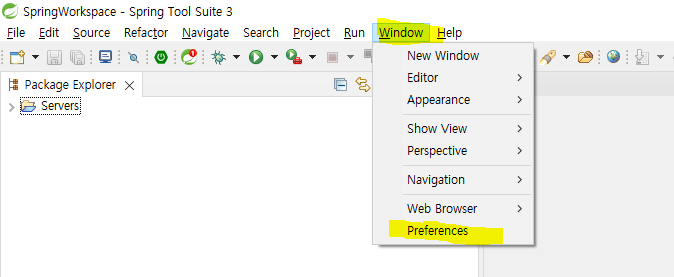
## 프로젝트환경설정

<figure><img src="https://3572862491-files.gitbook.io/~/files/v0/b/gitbook-x-prod.appspot.com/o/spaces%2FUON3CGxVeoUR2YdtAhxl%2Fuploads%2FT9EYm8MdyYgC19J1wKh4%2Fimage.png?alt=media&amp;token=d68783d4-43e6-4b59-92cc-bc537b3f3ede" alt=""><figcaption><p>환경설정탭Window-Preferences</p></figcaption></figure>

### 1) 인코딩설정

인코딩 설정이 필요한 위치로 찾아가서 인코딩 utf-8로 변경

* General > Editors > Text Editors&#x20;
* General > Workspace&#x20;
* JSON > JSON Files&#x20;
* Web > Css Files&#x20;
* Web > HTML Files&#x20;
* Web > JSP Files

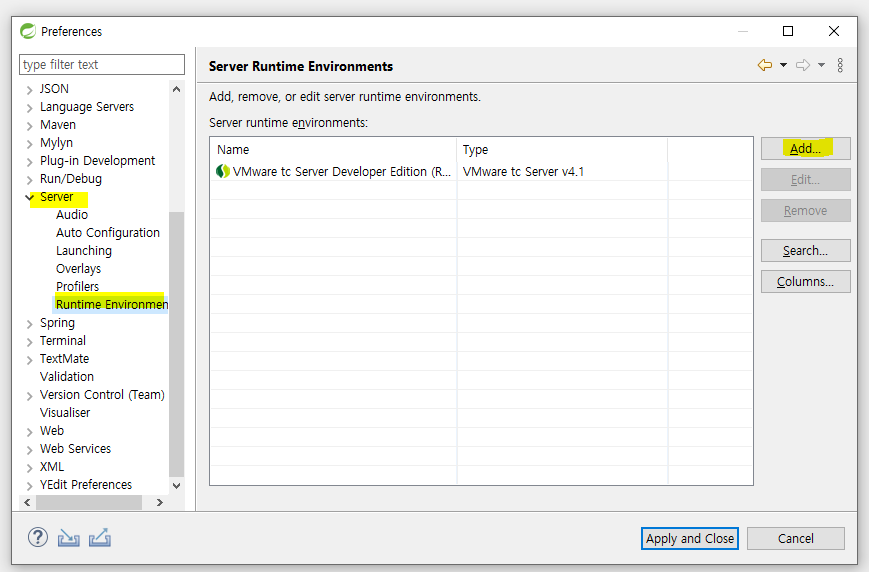
### 2)  Server 추가

Server > Runtime Enviroment > Add버튼 클릭

<figure><img src="https://3572862491-files.gitbook.io/~/files/v0/b/gitbook-x-prod.appspot.com/o/spaces%2FUON3CGxVeoUR2YdtAhxl%2Fuploads%2FQoREyEzwAPbtgDoXWb1P%2Fimage.png?alt=media&amp;token=b35ed8bc-1a4d-415a-a643-5243dacfaf93" alt=""><figcaption><p>Windows > Preference > Server > Runtime Environment > Add</p></figcaption></figure>

Apache > Apache Tomcat 9.0버전 선택

<figure><img src="https://3572862491-files.gitbook.io/~/files/v0/b/gitbook-x-prod.appspot.com/o/spaces%2FUON3CGxVeoUR2YdtAhxl%2Fuploads%2FdlGImNTt7eP08kI99tuM%2Fimage.png?alt=media&amp;token=48f05d49-2ab9-406c-981b-5a61043de7bb" alt=""><figcaption><p>Apache > Apache Tomcat v9.0 > Next</p></figcaption></figure>

Browse클릭 후 압축해제한 톰캣의 경로를 선택 한 후 Finish

<figure><img src="https://3572862491-files.gitbook.io/~/files/v0/b/gitbook-x-prod.appspot.com/o/spaces%2FUON3CGxVeoUR2YdtAhxl%2Fuploads%2F4pQ4Ak4u7U8afx2ET44D%2Fimage.png?alt=media&amp;token=900a905d-0b1f-4999-b4b4-979ece682359" alt=""><figcaption><p>Browse > apache-tomcat설치경로 선택 > Finish</p></figcaption></figure>

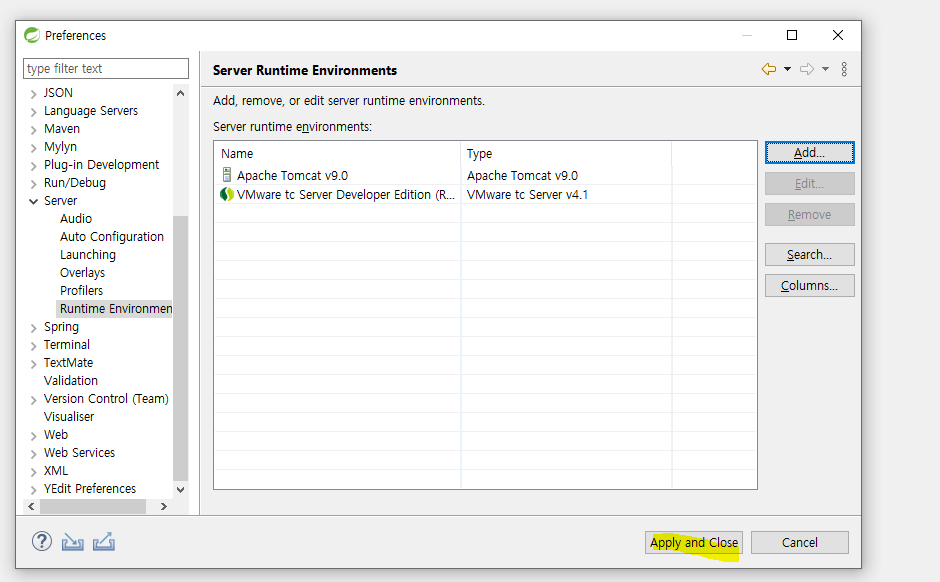
Apply and Close클릭

<figure><img src="https://3572862491-files.gitbook.io/~/files/v0/b/gitbook-x-prod.appspot.com/o/spaces%2FUON3CGxVeoUR2YdtAhxl%2Fuploads%2FQXbI9sciabEDUaV9L4s6%2Fimage.png?alt=media&amp;token=b71d1e75-09c7-4bf7-8ab1-b8f670310f96" alt=""><figcaption></figcaption></figure>

서버패널 우클릭 > new > server 선택

<figure><img src="https://3572862491-files.gitbook.io/~/files/v0/b/gitbook-x-prod.appspot.com/o/spaces%2FUON3CGxVeoUR2YdtAhxl%2Fuploads%2FYAard2SifPpAIVBmD4gY%2Fimage.png?alt=media&amp;token=4e280feb-91ed-4fb0-8e86-3e1524cbc49d" alt=""><figcaption></figcaption></figure>

Apache 서버 선택후 Finish

<figure><img src="https://3572862491-files.gitbook.io/~/files/v0/b/gitbook-x-prod.appspot.com/o/spaces%2FUON3CGxVeoUR2YdtAhxl%2Fuploads%2FsQdzrWrvkK8SiTQt4hcA%2Fimage.png?alt=media&amp;token=8c07c79c-d8cd-4e81-ab83-43489301f739" alt=""><figcaption></figcaption></figure>

서버 더블클릭후 포트번호, Server modules without publishing 체크

{% hint style="info" %}
대부분의 어플리케이션 기본포트가 8080이라 포트충돌로 인한 서버실행 오류가 발생할 수 있기때문에 안전한 포트번호로 변경해줄 필요가 있다.
{% endhint %}

<figure><img src="https://3572862491-files.gitbook.io/~/files/v0/b/gitbook-x-prod.appspot.com/o/spaces%2FUON3CGxVeoUR2YdtAhxl%2Fuploads%2F2akBk70l4s8Z6KjpRA2Q%2Fimage.png?alt=media&amp;token=8f95f24d-c1cc-463a-82a1-d1cc18c8166a" alt=""><figcaption></figcaption></figure>

### 3) 콘솔 출력 설정

스프링프레임워크는 내장 logging 기능이 많아 기본 콘솔 버퍼사이즈(800000)로는 모든 로깅을 보지 못할 수 있음.&#x20;

Run/Debug > Console > console buffer size 1,000,000으로 변경

<figure><img src="https://3572862491-files.gitbook.io/~/files/v0/b/gitbook-x-prod.appspot.com/o/spaces%2FUON3CGxVeoUR2YdtAhxl%2Fuploads%2Fd7GfMMTgW1SP7LXMCq5Z%2Fimage.png?alt=media&amp;token=dba52c84-b808-445c-93d8-7e387d35c2bb" alt=""><figcaption></figcaption></figure>

### 4) Maven설정&#x20;

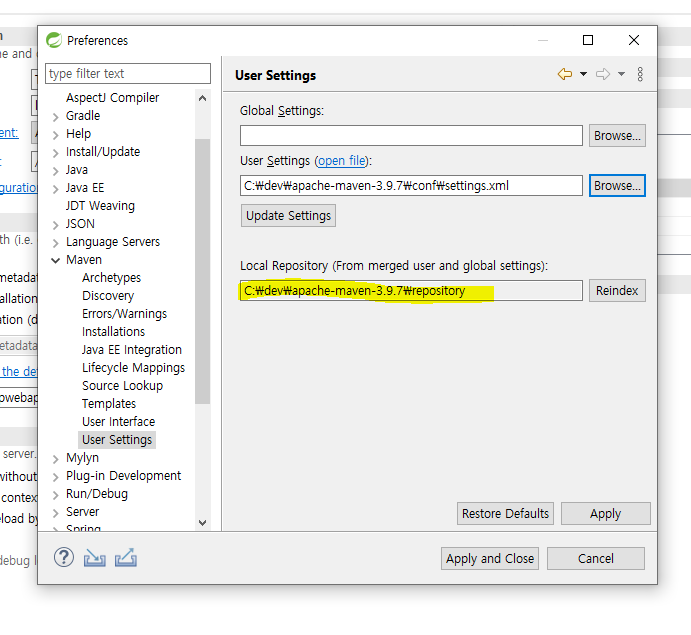
현재 프로젝트의 메이븐 기본 저장소 경로를 바꾸기 위한 설정

Maven - User Settings - Browser선택

<figure><img src="https://3572862491-files.gitbook.io/~/files/v0/b/gitbook-x-prod.appspot.com/o/spaces%2FUON3CGxVeoUR2YdtAhxl%2Fuploads%2FS1RO1Af0HoYCnWtTiPUw%2Fimage.png?alt=media&amp;token=61e37a86-17f9-4200-b39f-c01bb4339438" alt=""><figcaption></figcaption></figure>

메이븐 설치경로에서 conf > settings 선택후 열기

<figure><img src="https://3572862491-files.gitbook.io/~/files/v0/b/gitbook-x-prod.appspot.com/o/spaces%2FUON3CGxVeoUR2YdtAhxl%2Fuploads%2FBU37xhAiOuBAeqhP9n8o%2Fimage.png?alt=media&amp;token=080368d4-83ee-40cd-bd9a-0f1e064405a5" alt=""><figcaption></figcaption></figure>

Local Repository 경로 변경확인 후 Apply and Close
<figure><img src="https://3572862491-files.gitbook.io/~/files/v0/b/gitbook-x-prod.appspot.com/o/spaces%2FUON3CGxVeoUR2YdtAhxl%2Fuploads%2FO7xquTAj5sua9y3OtV5b%2Fimage.png?alt=media&amp;token=4f4fb611-5c16-4b28-a6cb-e0fdd7c2542c" alt=""><figcaption></figcaption></figure>